Report, discover, claim
The demo connects item reporting, filtered browsing, potential matches, and ownership-claim states.
UniFind — Campus Lost & Found
Interactive demoFictional records and browser-local storage. Login and administration are simulated.
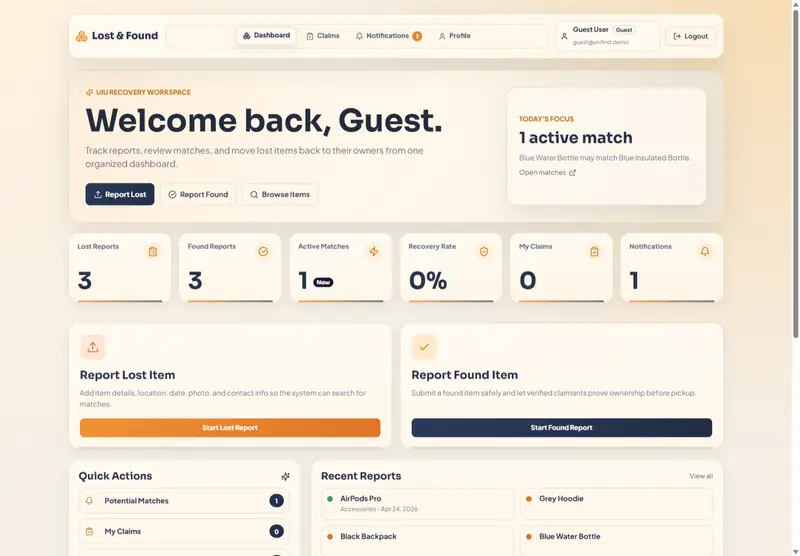
Bring scattered lost-and-found reports into a clear journey: report an item, discover a possible match, and track an ownership claim.
UniFind brings student reports, item browsing, notifications, and an administration workspace into one interface. The live showcase runs in the browser with fictional records and local storage. Login and administration are simulated; the repository also contains separate backend source.
Student-facing application workflows, browser state, and responsive dashboard interfaces.
A Zustand store and local storage connect reports, saved filters, claims, and notifications in the current browser. Guest access makes the workflow easy to inspect.
The source compares category, color, location, and description keywords. It weights these signals and surfaces matching pairs above a defined threshold.
Dedicated dashboard, item browser, reporting form, item-detail, and claim views separate discovery from the actions that follow.
Actual project screens. Select one to explore the details.
An explorable campus recovery workflow with guest access, linked student interfaces, and inspectable state logic.
The demo connects item reporting, filtered browsing, potential matches, and ownership-claim states.
The public store source contains the matching rules, seeded records, saved filters, and local persistence.
The gallery shows the dashboard, item browser, report form, and item details from the project.